

1. Botsitting
Technology eras have a way of conjuring up terms that borrow liberally from other spheres. “Bug fixing” and “Debugging” appeared early in the computer era, when a moth trapped in the Mark II computer was removed to fix the problem. “Internet Surfing” first came up in the early nineties (though “Channel Surfing” had been coined earlier in the TV context). “Doom scrolling” found its way into the lexicon – and our lives – as tech giants realised that negative or provocative news sells better and fine-tuned their social media algorithms. The Gen AI era gave us “Vibe Coding” a couple of years ago. And now we have a new candidate: “Botsitting”.
The 2026 Work AI Index report calls Botsitting “the work required to make AI usable, including feeding it missing context, checking its outputs, debugging its mistakes, rerunning prompts, and cleaning up the confident-but-wrong answers AI leaves behind.”
Botsitting, according to the report, is an invisible form of labour that consumes “an average of 6.4 hours a week — most of a full working day, every week”. It is deeply intertwined with traditional, prompt-based AI tools: the friction involved in manually prompting these tools is a primary driver of botsitting behavior. 60% of surveyed users rerun the same prompt through multiple tools because the first output wasn’t good enough, or because one tool could not complete the entire task. The resulting tool sprawl (77% juggle multiple tools each week, 33% use four or more) leads to an “AI toggle tax”: the cumulative cost in time, attention, and sanity that comes from constantly switching between disconnected AI tools.
All of which raises the question, why are knowledge workers – not casual users – still stuck with prompt-based tools? Three and a half years after ChatGPT’s release, why are knowledge workers still mostly chatting with AI?
2. The knowledge worker’s AI
Knowledge workers I’m referring to are not the software programmer type. Think of typical white-collar users who work with data and information, on a desk or on the move. This class of users is also different from casual end users: our knowledge worker wants to accomplish a goal through a series of tasks, while the casual end user simply wants an answer to a query.
Such knowledge workers don’t necessarily want an LLM. They want a research assistant, a financial analyst, a slide-deck generator, a proposal reviewer, and so on. Instead of dealing with an empty prompt box, they seek a product that embeds domain knowledge: medical AI products that know how clinicians reason, legal assistants that understand the nature of contracts in a domain, design tools built around the principles of visual hierarchy.
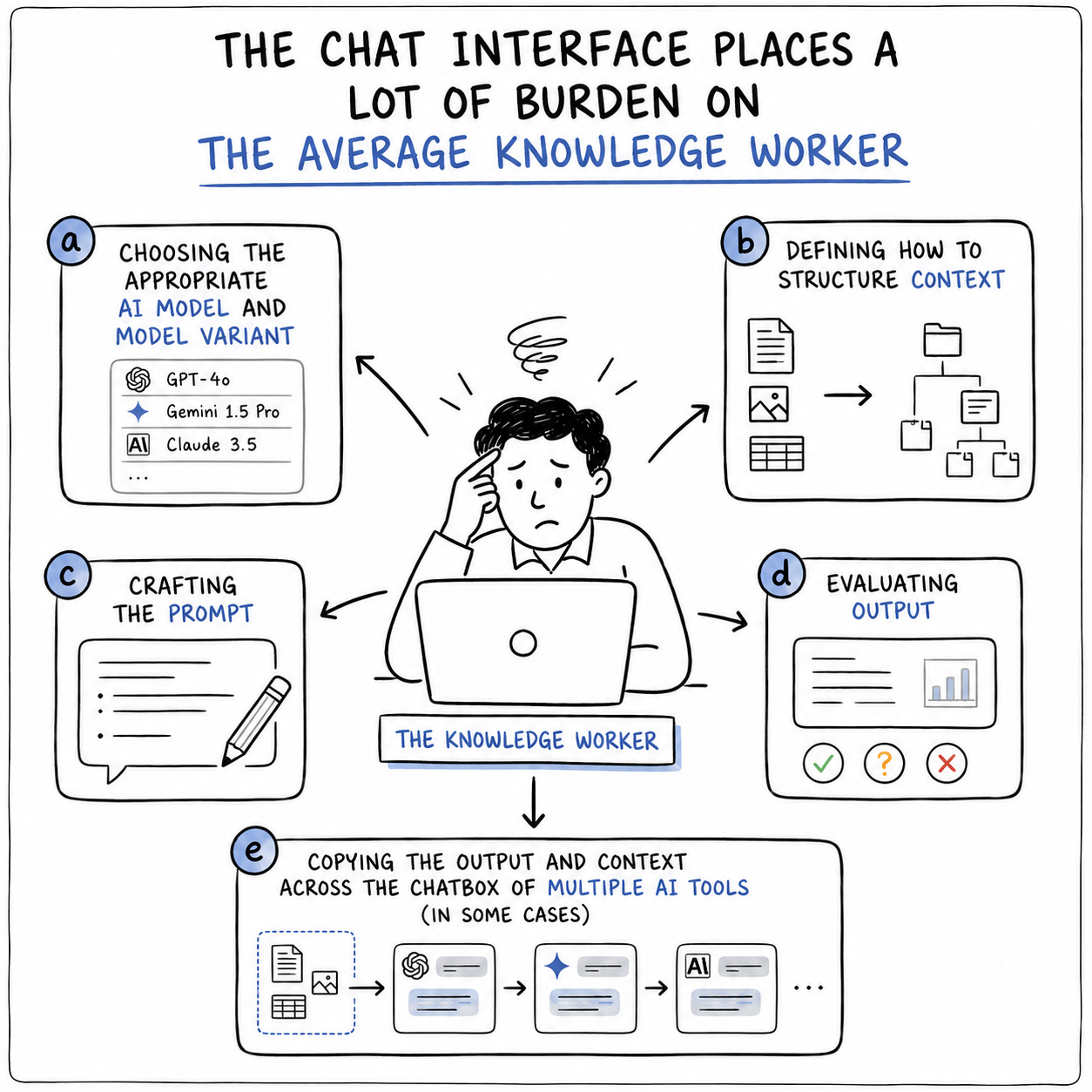
Knowledge workers also don’t want to choose the best LLM for a micro-task, and then copy-paste input/output/context across multiple LLMs or tools to accomplish their goal. They want a product that eliminates this tool supply chain where the human is the integration layer.
A “do anything” surface offers limited guidance on how to do the specific thing in front of you.
Staying on top of news around the latest AI model isn’t a priority for this knowledge worker. Given the pace of AI progress, this is hard even for an enthusiastic user. What they look for is a product that does this job of choosing the best LLM (including model variant) for their task.
But products with these qualities are rare. We are still largely at the mercy of Gen AI tools that expect us to do that work of knowing which LLM (and model variant) to use for what purpose, of defining – through a well-crafted prompt – the result we seek, and of evaluating the tool’s response. All of which leads to botsitting.
3. Emerging alternatives
The frontier model companies (OpenAI, Anthropic, Google) have now given us tools to build one type of intermediate AI product for knowledge workers. Claude Skills or Gemini Gems are reusable modules of knowledge work in a domain. For instance, a Gemini Gem can contain instructions and a rubric to evaluate a proposal; a Claude Skill can contain both instructions and code to research a topic and generate a nicely formatted document.
Claude Cowork, a tool that enables you to build such “AI skills”, is the Gen AI analogue of low-code tools like Bubble, Outsystems or Mendix of an earlier era. Those low-code tools occupied the space left open by standard SaaS products like SAP, Salesforce, Workday, or Atlassian. Custom workflows that digitise a firm’s bespoke processes can now be built by tools like Claude Cowork or Claude Code. But exposing them as pure “skills” that need prompting via a chat-based interface still feels like a first generation solution.
This dominant narrative, with agents at the center of the knowledge worker ecosystem, doesn’t leave much space for products with human-centred user interfaces.
What this user segment needs are AI products that capture user intent and context at a level of abstraction higher than text. The blinking cursor is a barrier to AI adoption among knowledge workers: a large percentage of these users don’t want to experiment with prompts – they simply want the right output with minimal effort.
Products that offer an interface to data are one class of such AI products. Instead of a chat window, the page surfaces a visual that allows users to explore – visually – different dimensions of data. Take this CSR Navigator, for example. The page allows you to explore CSR funding in India based on publicly available data. Instead of making the user imagine her queries and type them into a chatbox, this interface allows her to navigate the data and explore it visually.
4. The problem with chat
Offering chat as the main affordance – an interaction pattern, a way for users to relate to something – in a solution for knowledge workers leaves to the user the task of choosing the appropriate model and model variant, defining how to structure context, crafting the prompt, and evaluating output. It may also involve copying the output and context across the chatbox of multiple tools. A product with a well-designed interface must be doing all this instead. And since compelling visual interfaces around LLMs are a rarity, we continue to see more instruction on how to write better prompts. That’s a skill that ought to lose its relevance to all but a small group of specialist users who build AI products.
The critique of chat as an interface to AI isn’t new. The UX community flagged it not long after ChatGPT’s explosion led to a chatbox being appended to every other product. In her 2023 essay “Why chatbots are not the future” Amelia Wattenberger argued that a blank text box provides no visual cues about what the AI tool can or cannot do, shifting the burden onto the user to figure out the right prompts instead of baking that guidance into the interface. Maggie Appleton, after outlining why she hates chatbots, offered three interesting alternatives: Daemons, Branches, and Epi.
These critiques, though, stop at the interface. Swapping the chat box for a better surface only improves one tool. The knowledge worker’s problem is often larger: a goal spanning research, analysis, and output across multiple tools, with a human as the integration layer. To solve the supply chain issue, we need specialized products with a user interface.
5. AI agents to the rescue?
Will AI agents make the user interface obsolete? If you believe those peddling AI hype, this indeed is the direction we are all headed. The most commonly cited example is the travel “agent” that plans your itinerary and makes all your bookings. A remote scenario for some, this is the world that’s being actively imagined into existence by AI firms.
Steven Levy, writing in Wired, outlined this vision in the iPhone context:
AI threatens to disrupt the entire iPhone ecosystem. By the end of this decade, it’s unlikely that people will swipe on their phones to tap on Uber or Lyft. They will just tell their always-on AI agent to get them home. Or that agent will have already figured out where they need to go, and the car will be waiting without the friction of a request. “There’s an app for that,” may be replaced by “Let the agent do that.”
John Gruber responded to this idea, calling it “pure fever dream high-on-the-hype fantasy.“
Ethan Mollick recently wrote about this trend too: “We are moving from a world where non-experts use chatbots to fill in gaps to one in which experts use agents to get work done.”
The promise of AI agents for non-expert knowledge workers is just that right now: a promise. Automating workflows for such users using agents is a non-trivial matter for use-cases that go beyond simple individual productivity tasks related to mail, calendar, or documents1.
This dominant narrative, with agents at the center of the knowledge worker ecosystem, doesn’t leave much space for products with human-centered user interfaces. So the choice – between offering knowledge workers a good user interface versus a chat-based one – isn’t just design-related: it’s a bet on who will be at the center of workflows, the human or an AI.
6. Why chat still dominates
The flexibility of the chat interface to invoke AI agents is the latest of its virtues.
Viewed broadly, the chat interface has many advantages: zero learning curve, infinite flexibility, accessibility across languages and literacy levels. All this stretches its reach. A user interface, by contrast, is limited to a specific use-case for a well-defined segment of users. If the solution provider’s goal is to reach more users across a wide range of use-cases, nothing can match the chat box. It is a “do anything” surface, limited only by a user’s imagination.
The chat interface’s reach and the cost of building a specialized interface are among key reasons why we haven’t seen many dedicated user interfaces for knowledge workers yet. Why invest in designing a specialised UI if you can inherit a general one that gives you usability for free2? But this, again, is the provider’s perspective. From the knowledge worker’s lens, the best interface is the one that lets her get the job done most efficiently and effectively, which often is a specialised one.
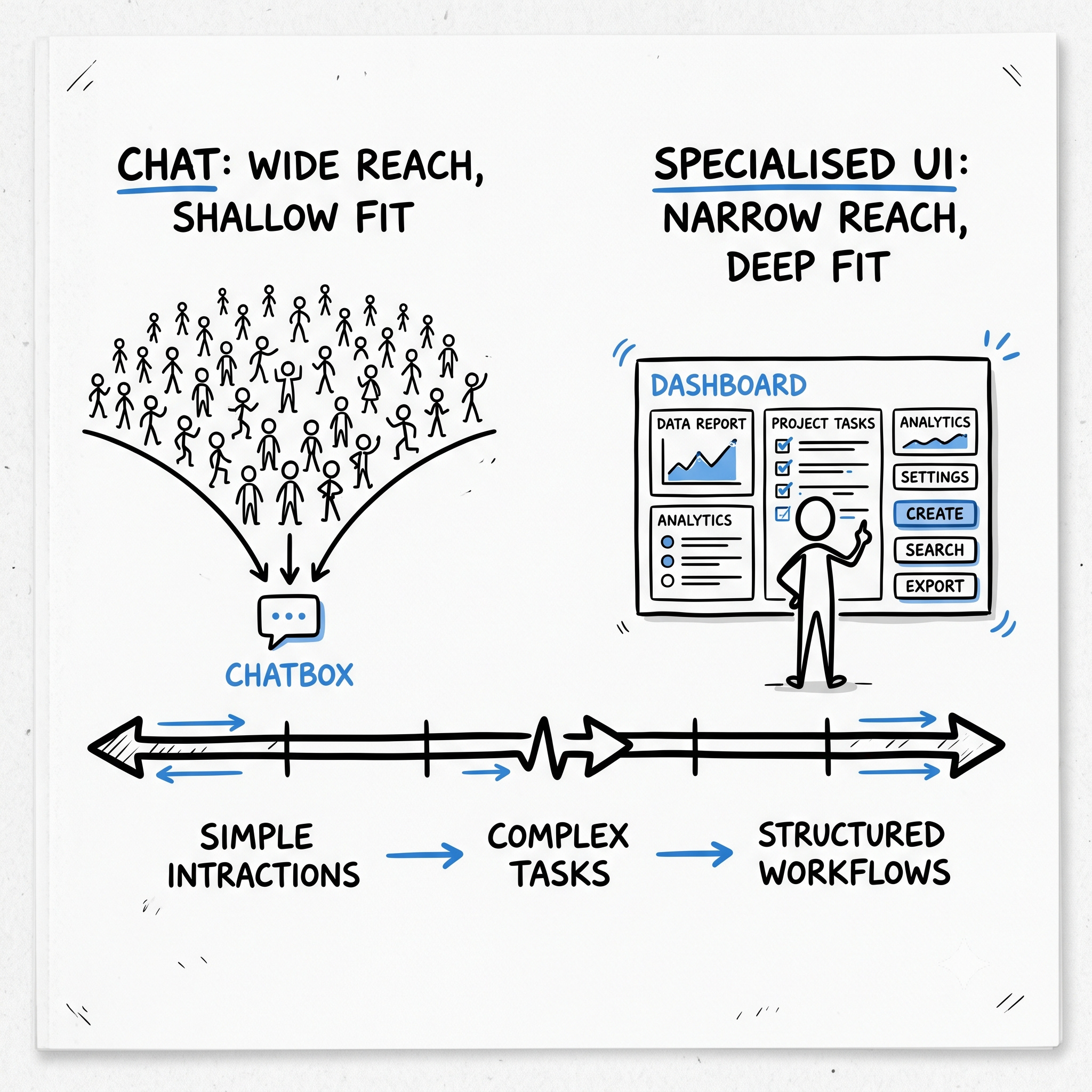
Identifying that common use-case or user segment and building a specialised product for it takes time and incurs cost. One reasonable strategy is to offer a generic chat-based interface first, then evolve to a specialised one. Another approach uses Forward Deployed Engineers (FDEs) to learn first from the chat-based usage, and then translate the learnings and patterns into a custom UI tailored to that context. This line of thinking offers hope: it is a matter of time, it suggests, before we see specialised products.
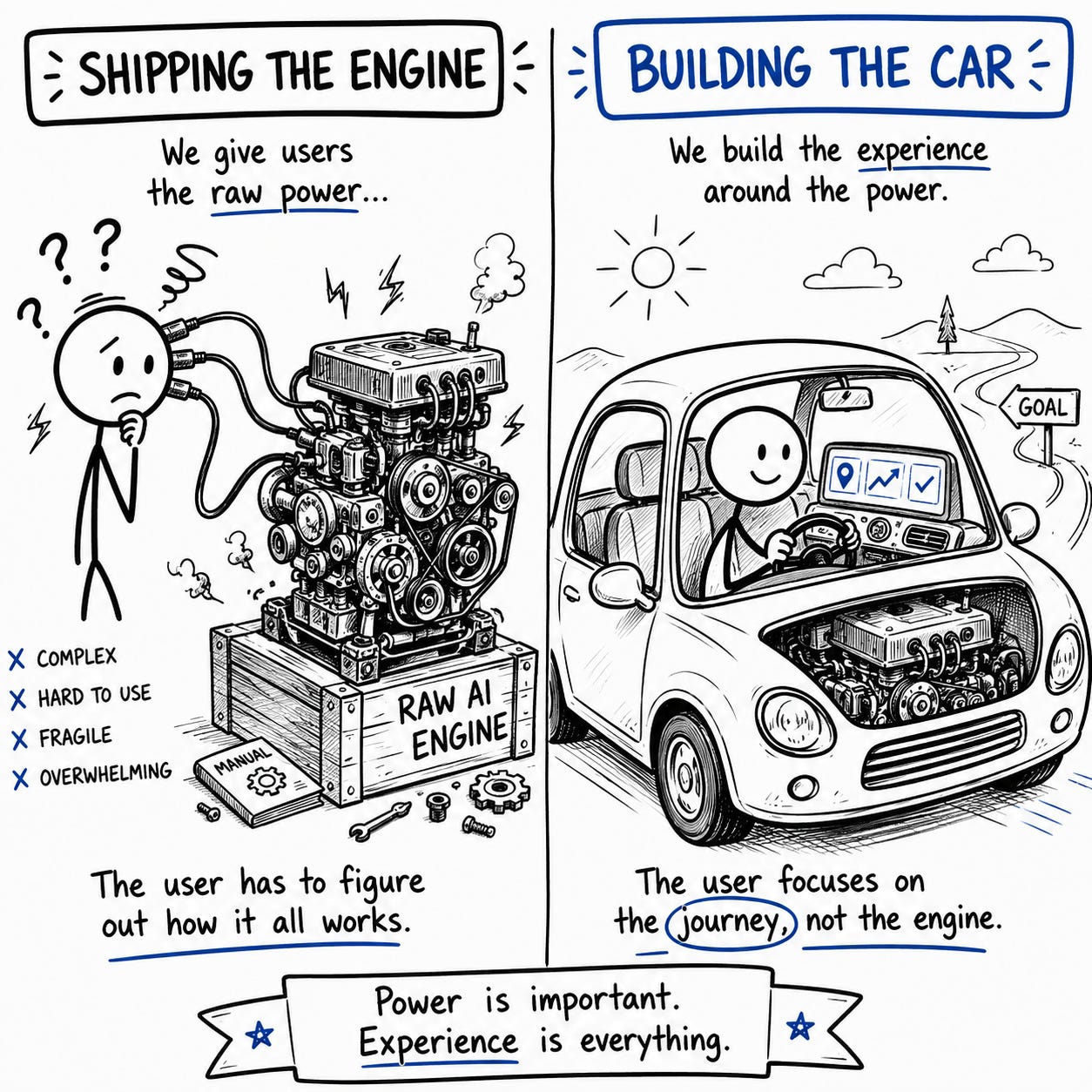
Then there is the confusion between capability and product. Each model released in recent years is more capable than the last, and the natural way to demonstrate raw capability is to expose it directly to the users via a chat interface. In this sense the industry has been optimising the engine and shipping the engine, rather than building new cars.
There is also a seductive belief that the model itself is the product, that it will eventually absorb the interface: as models get better at inferring intent, remembering context, and self-correcting, the need for specialised scaffolding melts away and the prompt box becomes sufficient after all. Like the hype and promise around agents, this too is an end-game that benefits the frontier model builders: they can capture more revenue if their models – and not products using the models – can solve most problems.
Chat as a medium has reached population-scale adoption through messaging tools like WhatsApp. Within organisations, Slack or Teams are now the primary means of employee communication. Leveraging such channels to deploy AI solutions is a no-brainer: one can reach the users where they are, instead of introducing a new app. But these channels also enable affordances beyond chat. In a recently concluded AI Cohort program, where seven Indian nonprofits worked on a range of AI use-cases, one solution leveraged WhatsApp as a channel but introduced menu-based input and a PDF format lesson plan – alongside with a short chat option. Even in a channel designed primarily for chat, other options are possible.
7. A world without chat as the main affordance
My imagination of a world where specialised products with user interfaces offer the power of AI to the average knowledge worker emerges from patterns of AI usage I’ve seen at Sattva (where I work) and some nonprofits I’ve engaged with in the last year. These users are very smart, but they may not be tech savvy; they aren’t tinkerers; and many are not experts or managers and hence aren’t good at delegating tasks. Even those who use AI frequently haven’t moved beyond using AI as an advanced search engine. And infrequent AI users are often overwhelmed by what the chat-based interface expects from them: the model choice, the intent, the context, the desired output format, the standard against which the output must be judged.
The highly flexible chat interface was a reasonable place to start. But for many knowledge workers it is unhelpful, because flexibility and usability pull in opposite directions. A “do anything” surface offers limited guidance on how to do the specific thing in front of you. Three and a half years after ChatGPT, knowledge workers are still navigating this surface — not because it is what they need, but because the alternatives are scarce. I’ve written before that productisation of LLMs is an act of inclusion. This is what’s at stake here. If chat stays the main affordance, AI remains a tool for experts who’ve learned to navigate its complexity. Everyone else keeps botsitting.
Recent experiences with digitising workflows for knowledge workers have made me conservative about how soon we’ll reach that promised land. I’ll write more on this in a follow up essay.
This applies to AI agents too. An agent can "figure out" what to do based on the outcome defined by the user. But for this to work well, sufficient context has to be defined and handed over to the agent.